GCP Workload Identity Pool for Github Workflow Integration
Setup GCP Workload Identity Pool for Github Workflow Integration
This setup guide will show you how to setup GCP Workload Identity Pool to allow Github Workflow to access GCP resources securely via OIDC.
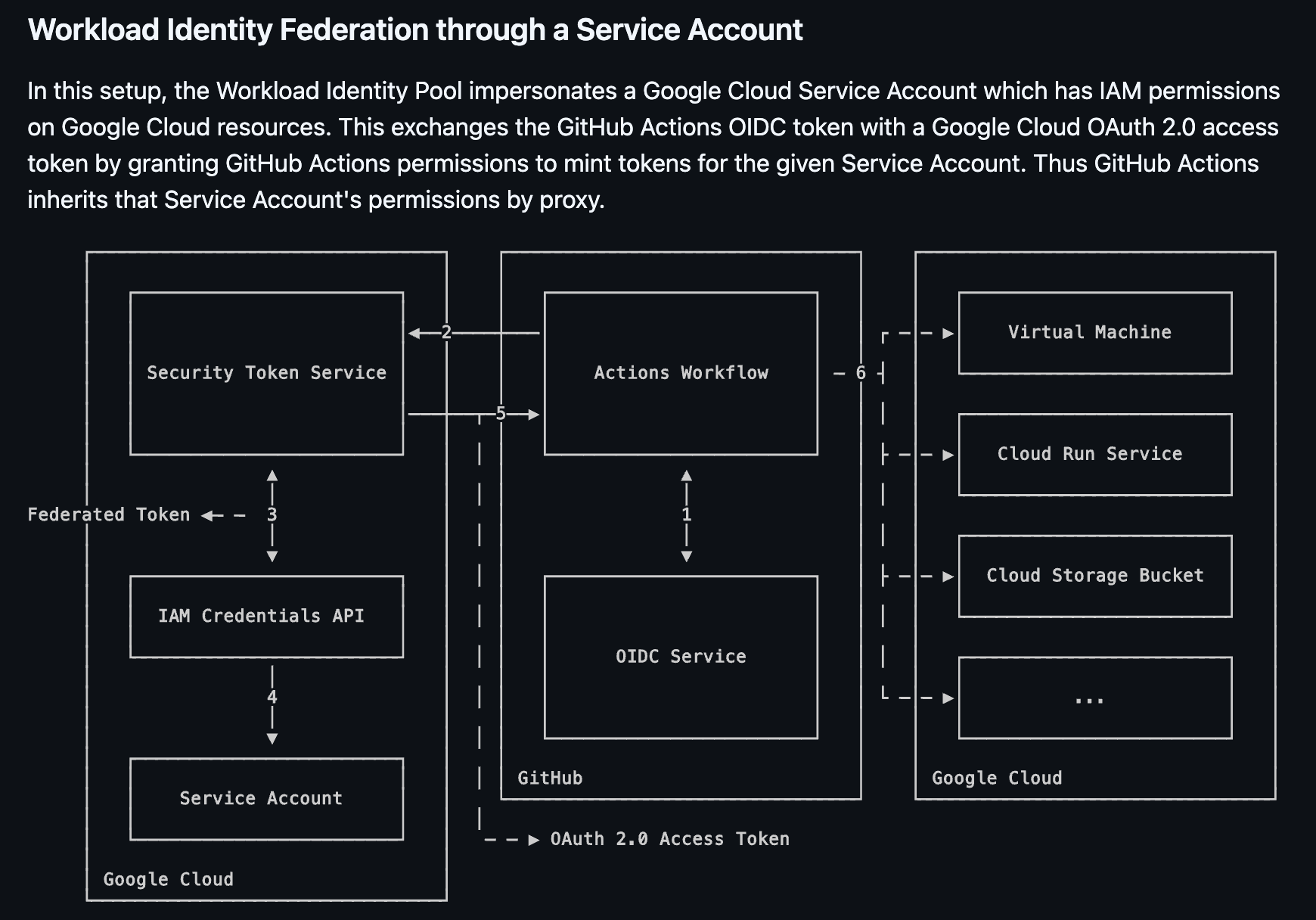
- From: https://github.com/google-github-actions/auth?tab=readme-ov-file#workload-identity-federation-through-a-service-account
OIDC Step-by-Step Flow
Step 1: Request OIDC Token
- The Actions Workflow requests an OIDC token from GitHub’s OIDC Service
- This token contains claims about the workflow (repository, branch, actor, etc.)
Step 2: Workflow Gets OIDC Token
- GitHub’s OIDC Service generates and returns the OIDC token to the Actions Workflow
- This token proves the workflow’s identity
Step 3: Exchange for Federated Token
- The workflow sends the GitHub OIDC token to GCP’s IAM Credentials API
- The Security Token Service validates the OIDC token against the configured Workload Identity Pool
- If valid, it returns a Federated Token (a GCP-recognized credential)
Step 4: Get Service Account Access Token
- The workflow uses the Federated Token to request an access token from the IAM Credentials API
- The IAM service checks if the Workload Identity Pool principal has
workloadIdentityUserpermission on the Service Account - If authorized, it returns an OAuth 2.0 Access Token for the Service Account
Step 5: Authenticate as Service Account
- The workflow receives the OAuth 2.0 Access Token
- This token represents the Service Account’s identity
Step 6: Access GCP Resources
- The workflow uses the Service Account’s access token to authenticate to GCP services
- Based on the Service Account’s IAM permissions (viewer, storage.admin, etc.), it can now access:
- Virtual Machines
- Cloud Run Services
- Cloud Storage Buckets
- Other GCP resources
Setup Guide
- This can be done via Console or gcloud cli
Create an iam workload identity pool
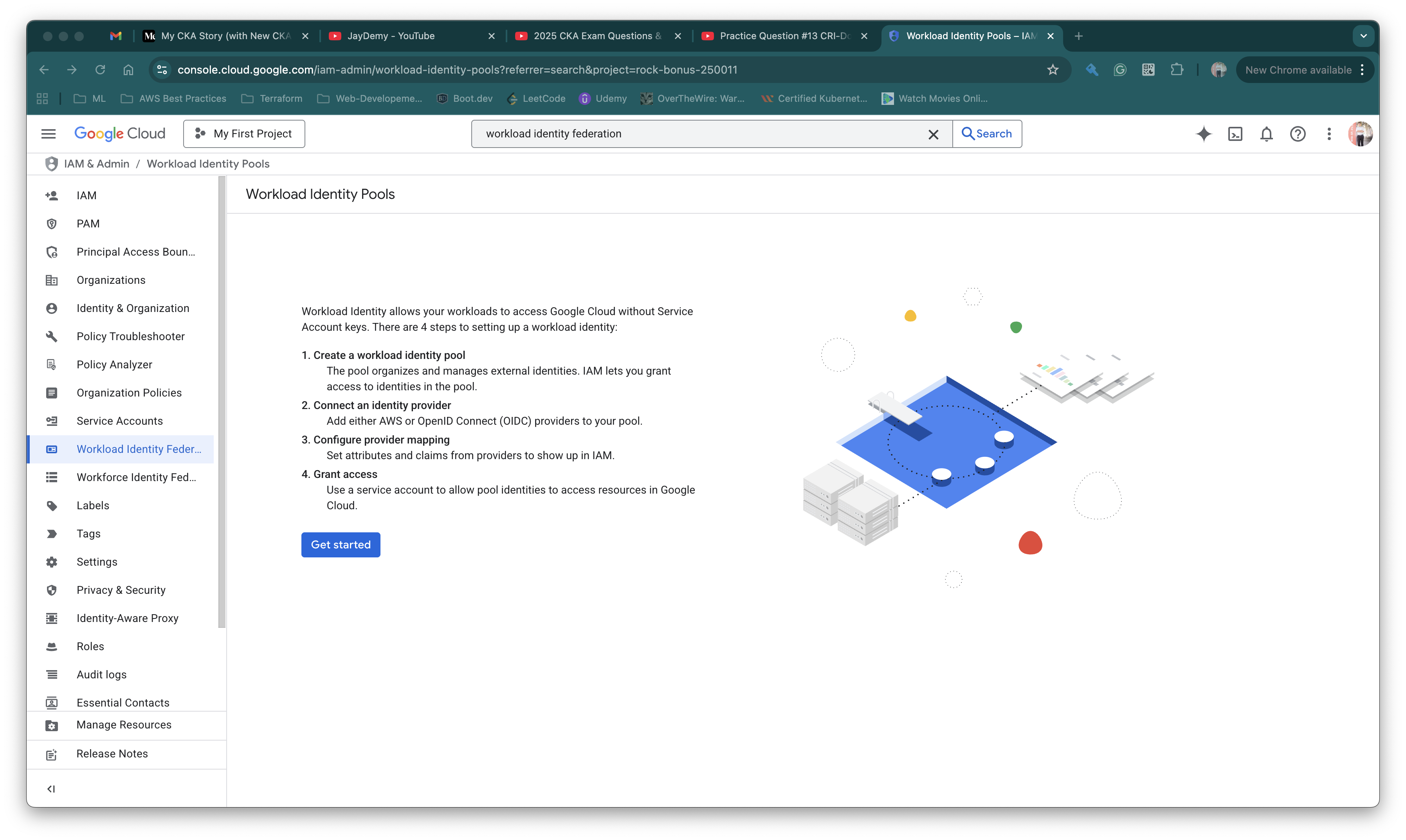
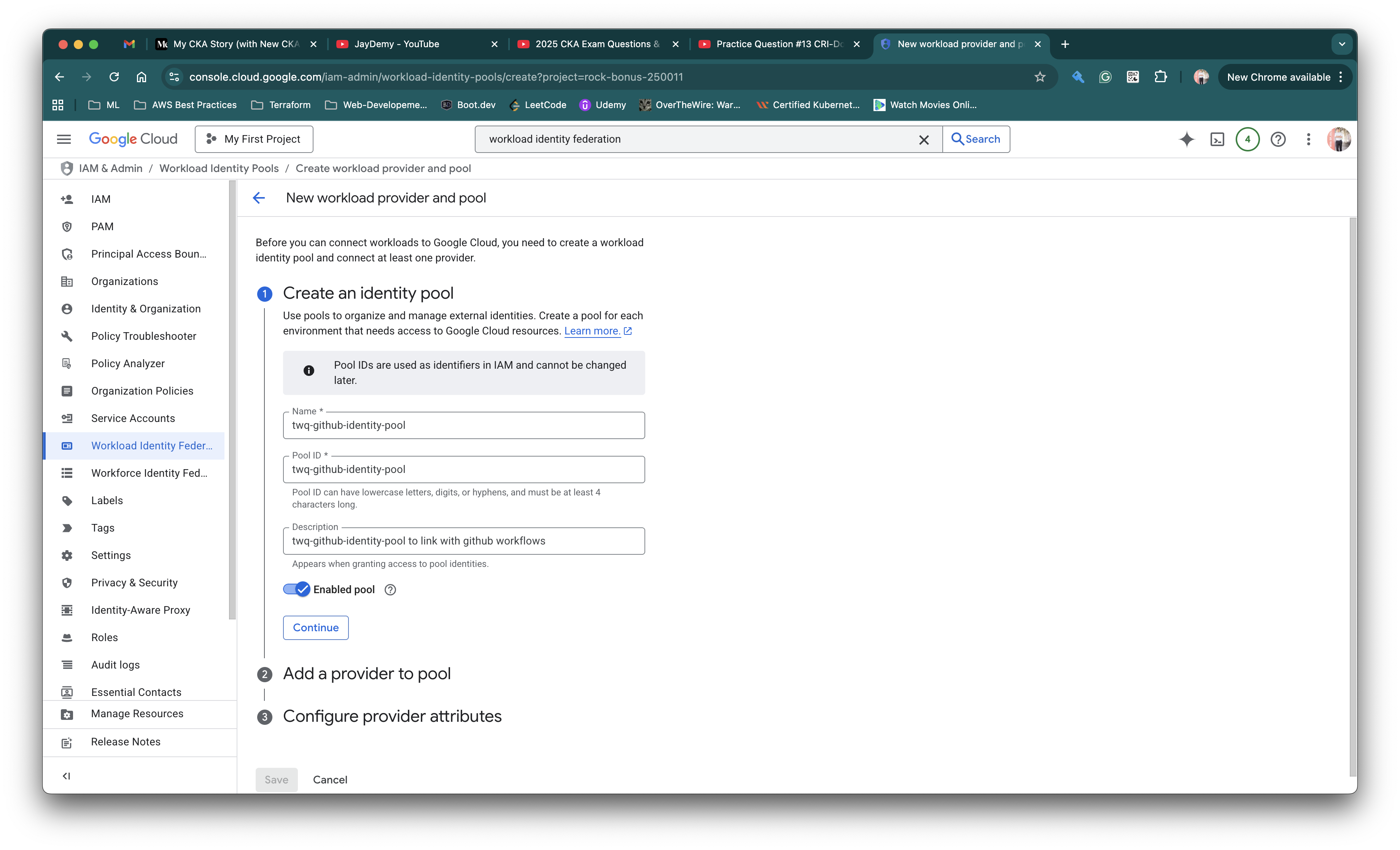
# Configure in console or use gcloud cli below
gcloud iam workload-identity-pools create "twq-github-identity-pool" \
--project="rock-bonus-250011" \
--location="global" \
--display-name="twq-github-identity-pool"
Add providers into IAM workload identity provider
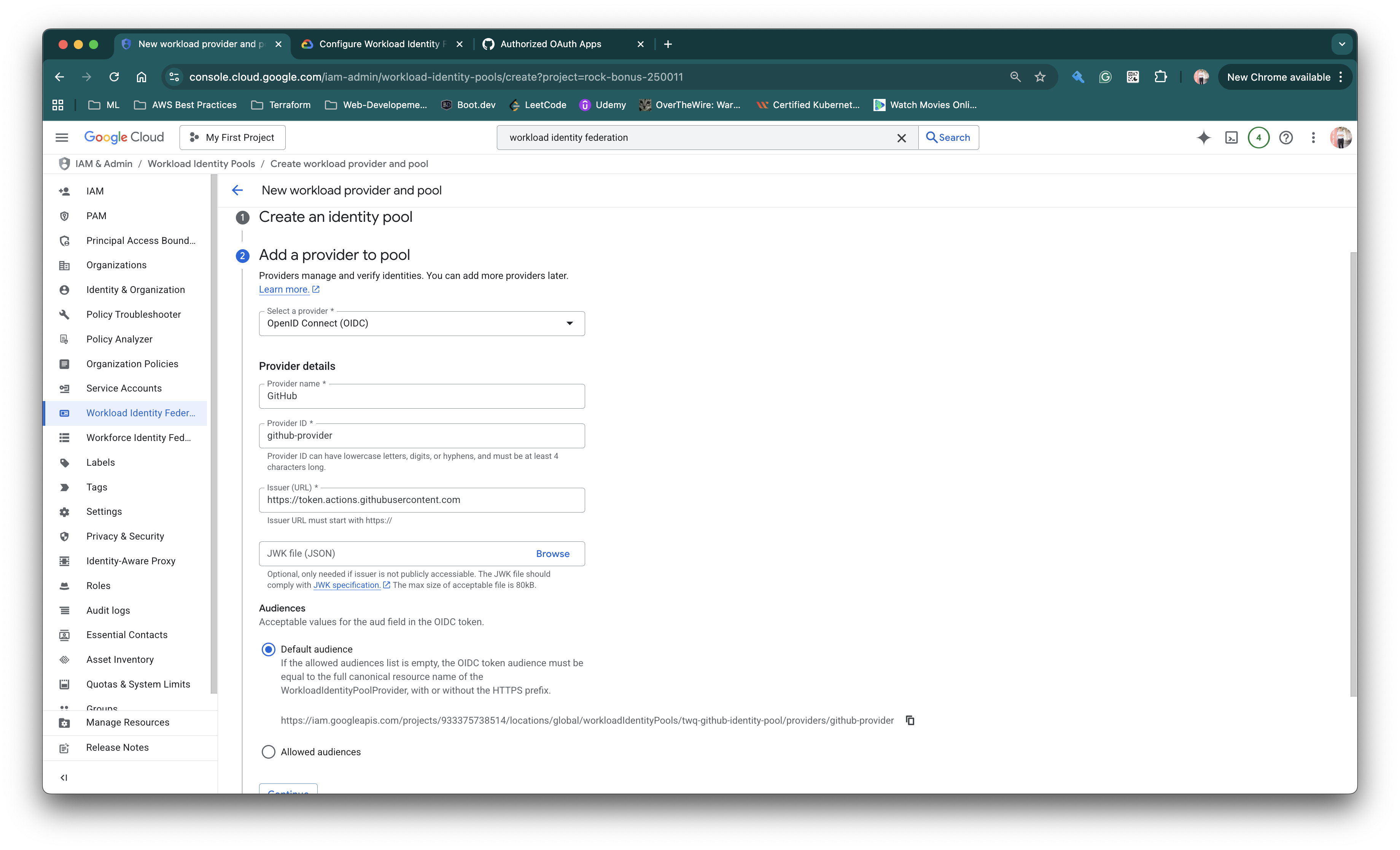
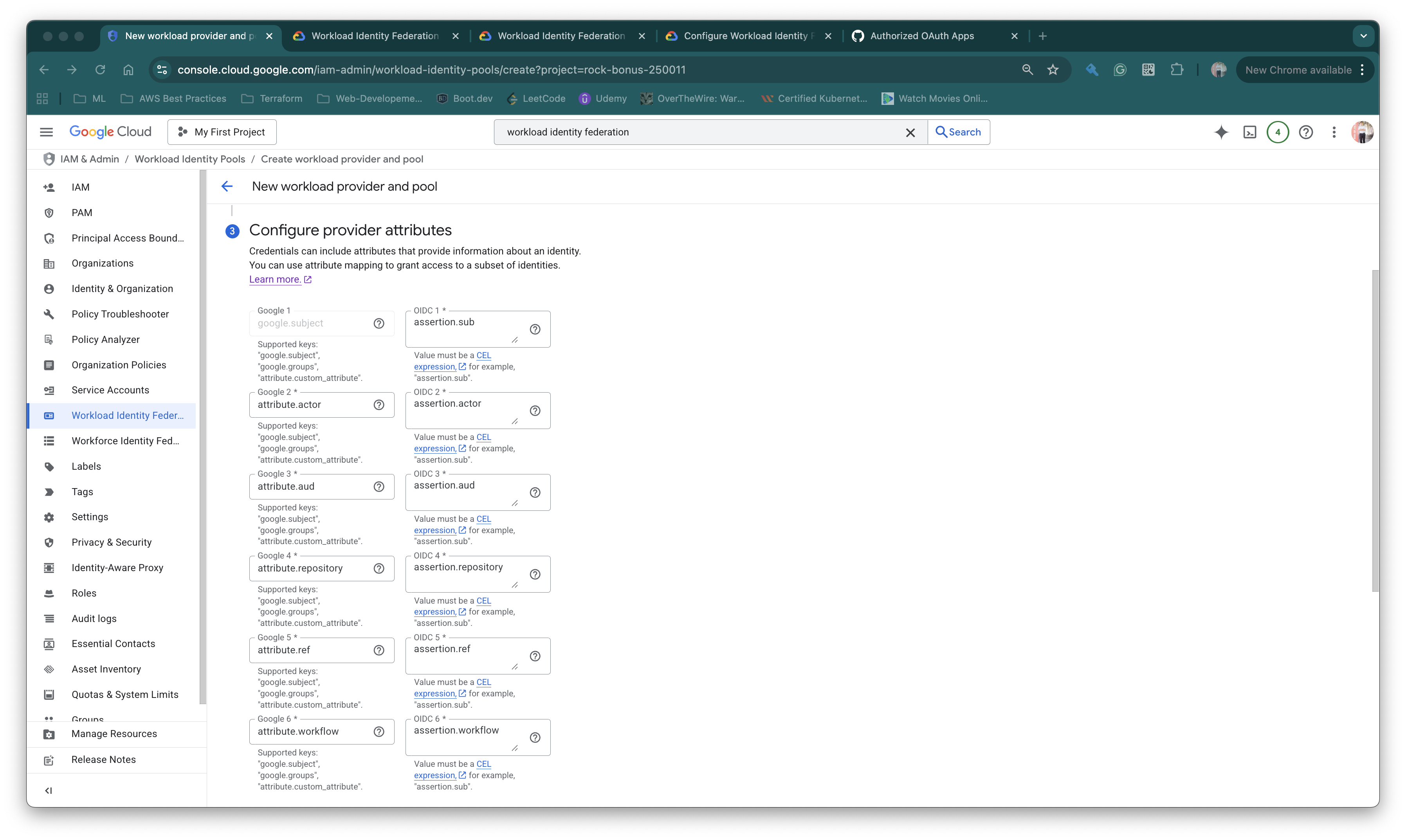
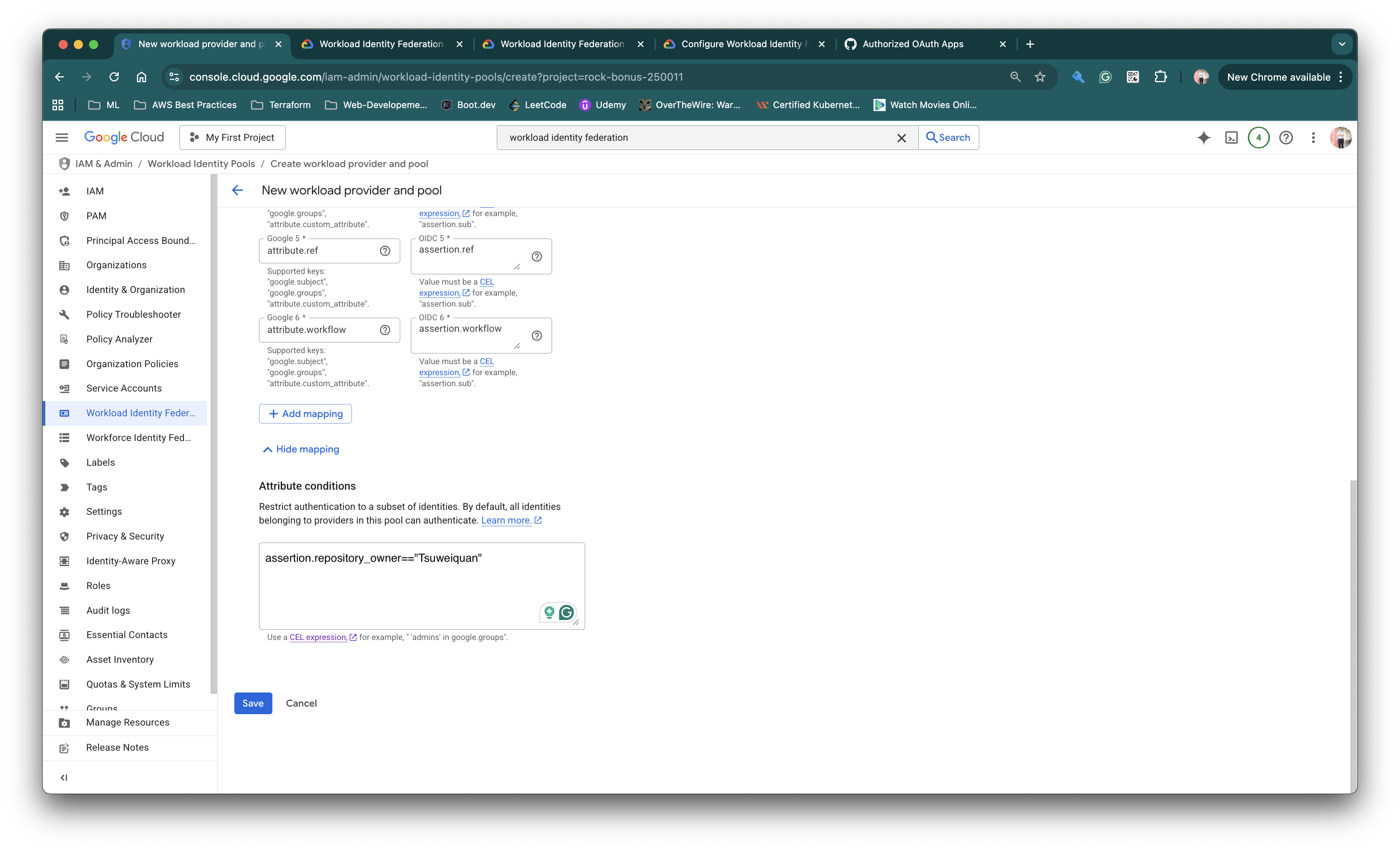
# Configure in console or use gcloud cli below
gcloud iam workload-identity-pools providers create-oidc "github-provider" \
--project="rock-bonus-250011" \
--location="global" \
--workload-identity-pool="twq-github-identity-pool" \
--display-name="twq-github-identity-pool" \
--attribute-mapping="google.subject=assertion.sub,attribute.actor=assertion.actor,attribute.aud=assertion.aud, attribute.repository=assertion.repository, attribute.ref=assertion.ref,attribute.workflow=assertion.workflow" \
--issuer-uri="https://token.actions.githubusercontent.com" \
--attribute-condition="assertion.repository_owner=='Tsuweiquan'"
google.subject=assertion.sub
-
google.subject: Required attribute. The unique identifier for the identity in GCP -
assertion.sub: Thesub(subject) claim from GitHub’s OIDC token. For GitHub Actions, this typically contains the repo and workflow info (e.g.,repo:myorg/myrepo:ref:refs/heads/main)
attribute.actor=assertion.actor
-
attribute.actor: Custom attribute you’re creating in GCP -
assertion.actor: Theactorclaim from GitHub’s token, which contains the username of the person/bot that triggered the workflow
attribute.aud=assertion.aud
-
attribute.aud: Custom attribute for audience -
assertion.aud: Theaud(audience) claim from the token
attribute.repository=assertion.repository
-
attribute.repository: Custom attribute for audience -
assertion.repository: Full repository name
attribute.ref=assertion.ref
-
attribute.ref: Custom attribute for audience -
assertion.ref: Git ref that triggered the workflow
attribute.workflow=assertion.workflow
-
attribute.workflow: Custom attribute for audience -
assertion.workflow: Restrict to specific workflow files
All these can be obtained from https://docs.github.com/en/actions/reference/security/oidc
# Attribute conditions
# This is to allow only repos belonging to "Tsuweiquan" owner to be able to use the provider
# THIS IS CASE SENSITIVE!!!
assertion.repository_owner=="Tsuweiquan"
Flow:
- When Github generates an OIDC token it will contain all the attributes in the JWT token.
- We selectively declares these attributes in GCP Workload Identity, so GCP only consume these attributes. With these attributes, GCP can use it to check if it’s allowed in the IAM policies before allowing access to GCP services.
- Unmapped attributes are ignored. There are many **Custom claims provided by GitHub** that I did not map above for now. In fact, the more we map the more flexible it is.
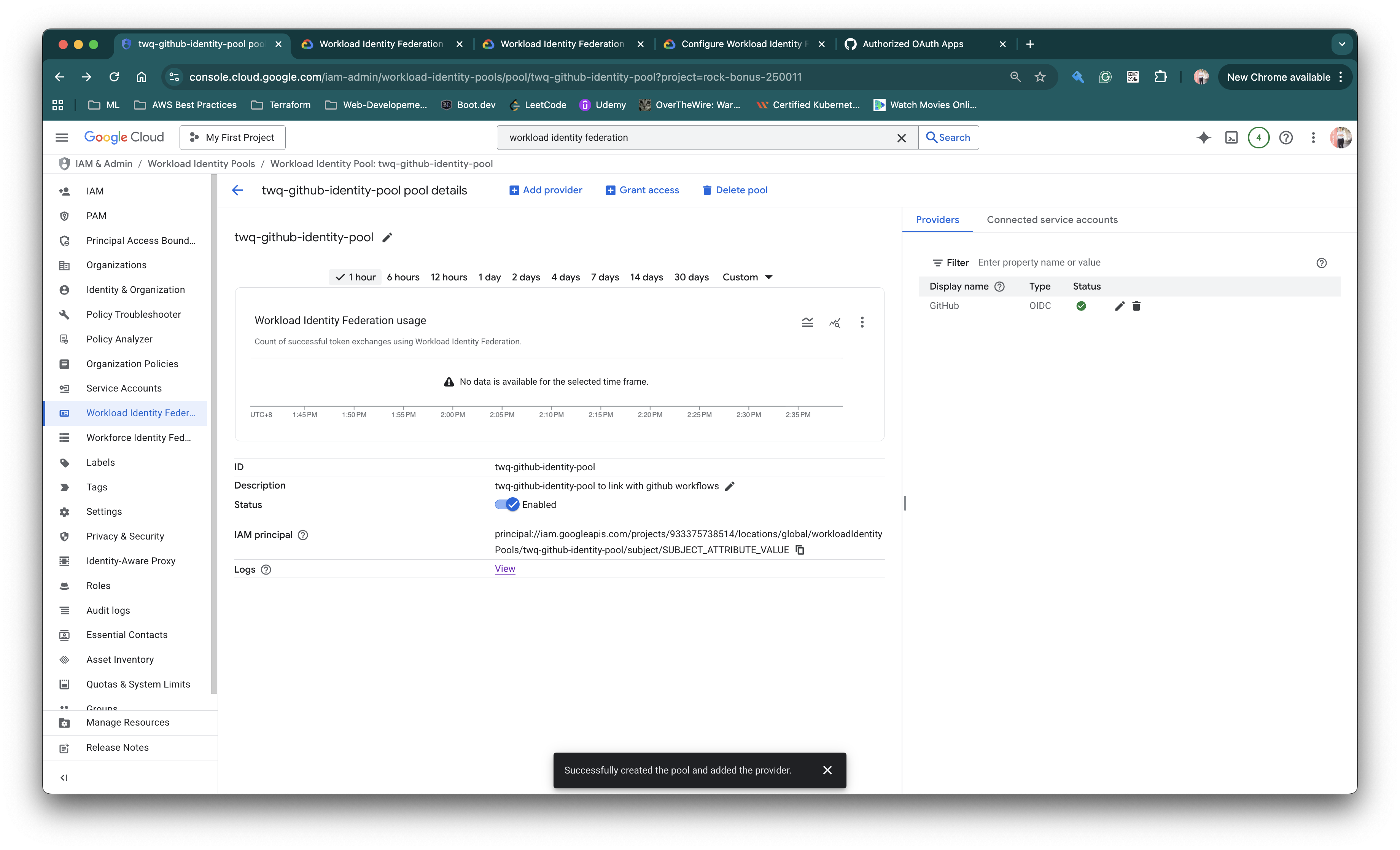
Create the service account to be used by Github OIDC
- Service account name:
github-oidc-sa
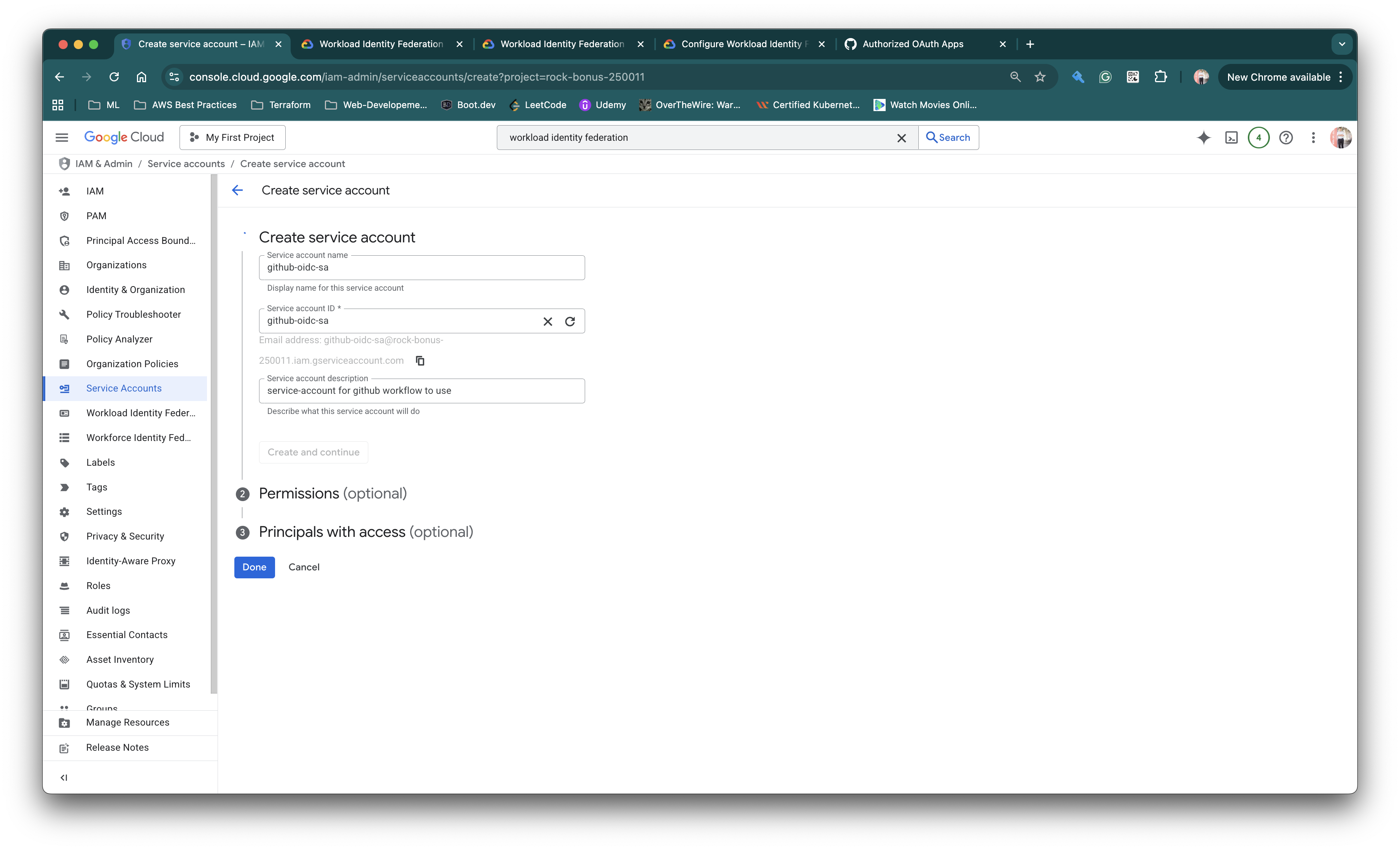
- We will give the
github-oidc-saservice account to have permissions to these services# Permissions roles/storage.admin roles/viewer
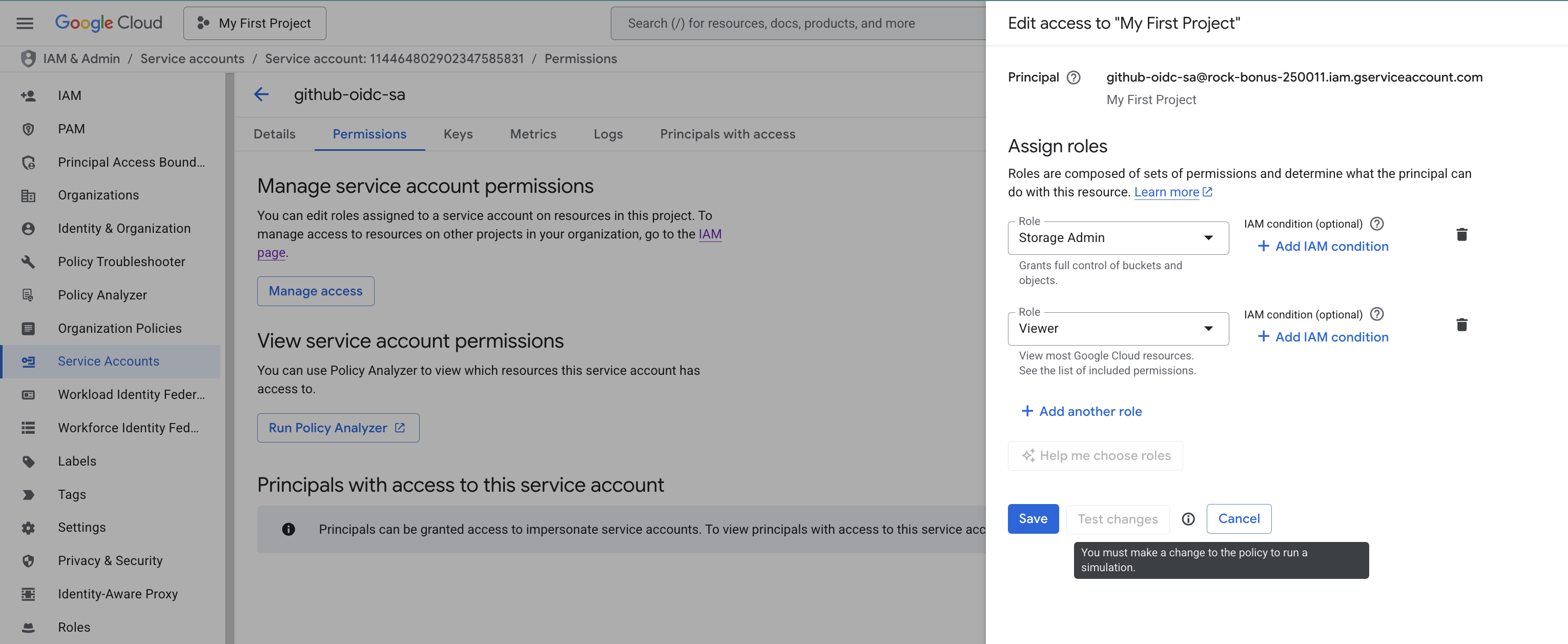
gcloud iam service-accounts create "github-oidc-sa" \
  --project "rock-bonus-250011"

gcloud projects add-iam-policy-binding rock-bonus-250011 \
  --member="serviceAccount:github-oidc-sa@rock-bonus-250011.iam.gserviceaccount.com" \
  --role="roles/storage.admin"

gcloud projects add-iam-policy-binding rock-bonus-250011 \
  --member="serviceAccount:github-oidc-sa@rock-bonus-250011.iam.gserviceaccount.com" \
  --role="roles/viewer"
Add the IAM Policy Binding of SA with Github repo
- This is the important step as we allow Github OIDC token generated from my Github repo (
github-to-gcp-oidc-integration) to access to GCP. - To allow this, we need to grant access via principals from Github
-
In the Console → Access to your Service account and click
Principal with access→Grant access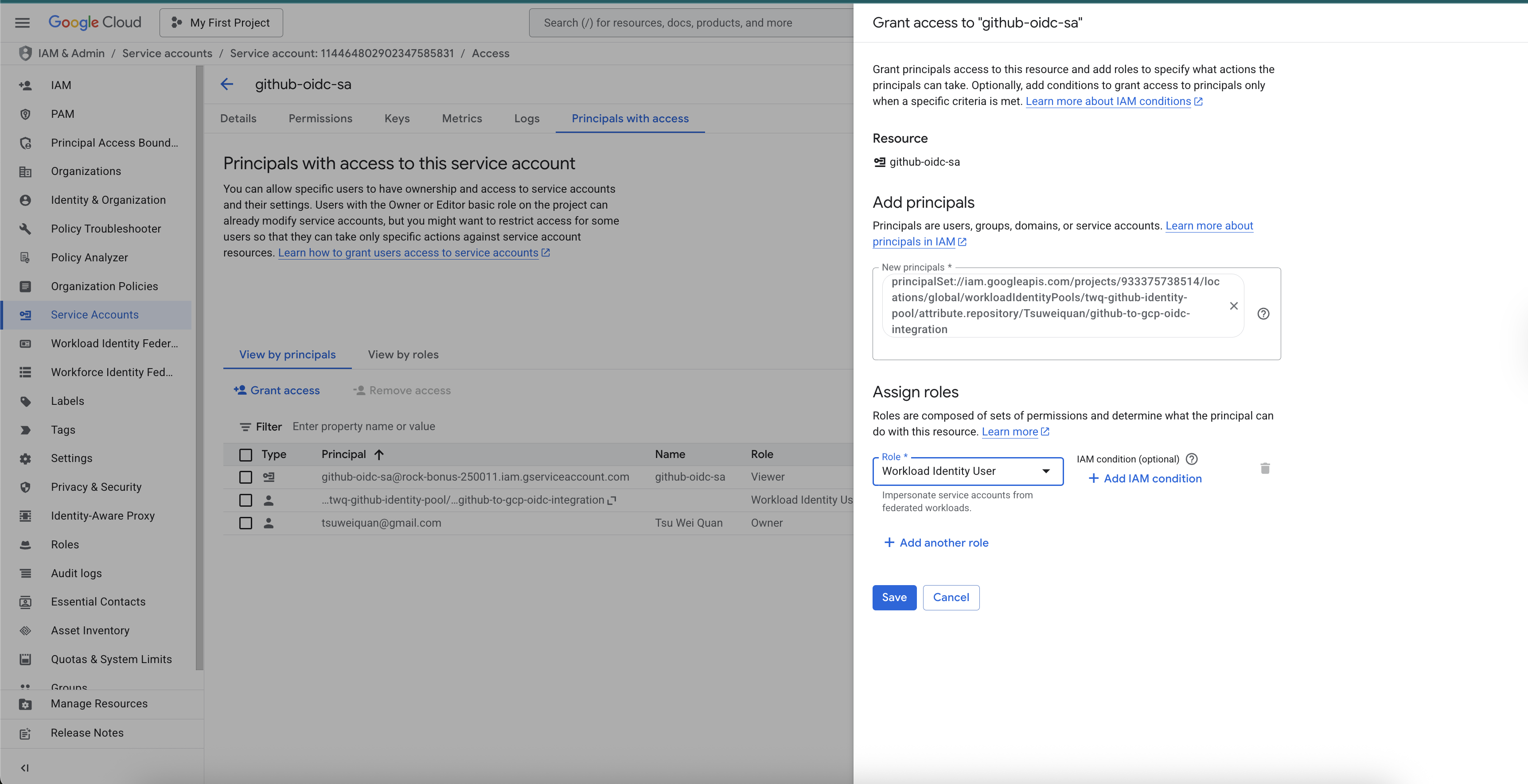
- It is essential that the principals is setup correctly with the right principalSet and the required assign role is
WorkloadIdentityUser
- It is essential that the principals is setup correctly with the right principalSet and the required assign role is
# Obtain your project number via this gcloud command
# gcloud projects describe rock-bonus-250011
# projectNumber: '933375738514'

# Sample gcloud cli
#gcloud iam service-accounts add-iam-policy-binding SERVICE_ACCOUNT_EMAIL \
#  --project="rock-bonus-250011" \
#  --role="roles/iam.workloadIdentityUser" \
#  --member="principalSet://iam.googleapis.com/projects/PROJECT_NUMBER/locations/global/workloadIdentityPools/k8s-pools/attribute.repository/YOUR_GITHUB_ORG/YOUR_REPO

export SERVICE_ACCOUNT_EMAIL="github-oidc-sa@rock-bonus-250011.iam.gserviceaccount.com"

gcloud iam service-accounts add-iam-policy-binding $SERVICE_ACCOUNT_EMAIL \
  --project="rock-bonus-250011" \
  --role="roles/iam.workloadIdentityUser" \
  --member="principalSet://iam.googleapis.com/projects/933375738514/locations/global/workloadIdentityPools/twq-github-identity-pool/attribute.repository/Tsuweiquan/github-to-gcp-oidc-integration"

# The command above will allow Github Repo to impersonate the service account, only from the Tsuweiquan/github-to-gcp-oidc-integration repository defined
- Take note
Tsuweiquanis case-sensitive.-
Tsuweiquanin this case is the GitHub organization
-
- Want more Fine Grain configurations? such as allowing master branch
# If you want to only allow certain repo and certain branch to allow access to GCP
# Add in --condition attribute
# Example:
gcloud iam service-accounts add-iam-policy-binding $SERVICE_ACCOUNT_EMAIL \
  --project="rock-bonus-250011" \
  --role="roles/iam.workloadIdentityUser" \
  --member="principalSet://iam.googleapis.com/projects/933375738514/locations/global/workloadIdentityPools/twq-github-identity-pool/attribute.repository/Tsuweiquan/github-to-gcp-oidc-integration" \
--condition="expression=attribute.ref=='refs/heads/master',title=only-master-branch"
Set up Github repo to use OIDC
- I will be using a test public repo for this.
- https://github.com/Tsuweiquan/github-to-gcp-oidc-integration
- Repo name:
github-to-gcp-oidc-integration
-
Setup secrets required for this to work
-
GCP_PROJECT_ID→rock-bonus-250011 -
GCP_PROJECT_NUMBER→933375738514- Run this command to obtain the number:
gcloud projects describe rock-bonus-250011
- Run this command to obtain the number:
-
GCP_SA_EMAIL→github-oidc-sa@rock-bonus-250011.iam.gserviceaccount.com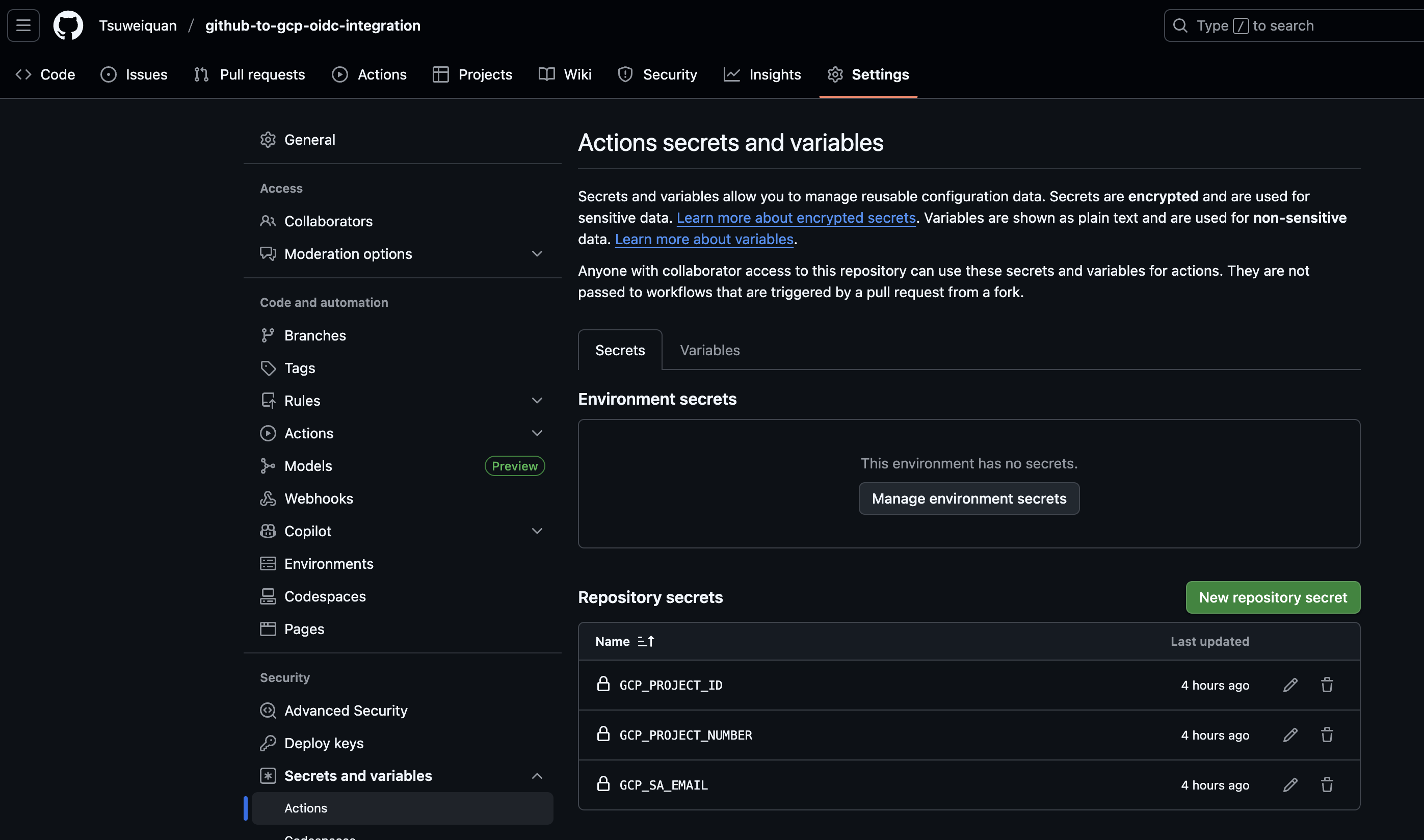
- Prepare the provider name that was created in the Workload Identity Pools
- Name:
github-provider - Run this command to obtain the name if you forget
gcloud iam workload-identity-pools providers list \
  --workload-identity-pool="twq-github-identity-pool" \
  --location="global" \
  --project="rock-bonus-250011"
- Name:
-
Set up GitHub Workflow
A github workflow that can be triggered via pull request or manually via console (workflow_dispatch).
The github workflow will authenticate to GCP via OIDC and use the github-oidc-sa service account to upload and delete object in Google Cloud Storage.
mkdir -p .github/workflows
touch .github/workflows/test-gcp-access.yml
vim .github/workflows/test-gcp-access.yml
name: Test GCP Access

# Allow workflow to run on pull request and manually via console
on:
  pull_request:
  workflow_dispatch:
    inputs:
      branch:
        description: 'Branch to run the workflow on'
        required: true
        default: 'master'

env:
  GCP_PROJECT_ID: $
  GCP_PROJECT_NUMBER: $
  GCP_WORKLOAD_IDENTITY_POOL: "twq-github-identity-pool"
  GCP_WORKLOAD_IDENTITY_PROVIDER: "projects/$/locations/global/workloadIdentityPools/twq-github-identity-pool/providers/github-provider"
  GCP_SA_EMAIL: $
  GCP_TEST_BUCKET: "tsuweiquan-test-gcp-bucket"

jobs:
  test-gcp-access:
    name: Test GCP Access
    runs-on: ubuntu-latest

    permissions:
      contents: 'read'
      id-token: 'write'

    steps:
    - name: Checkout code
      uses: actions/checkout@v4

    - name: Authenticate to GCP
      id: gcp-auth
      uses: 'google-github-actions/auth@v3'
      with:
        project_id: $
        workload_identity_provider: $
        service_account: $
        create_credentials_file: true
        export_environment_variables: true

    - name: Show gcp-auth step outputs
      run: |
        echo "GCP_PROJECT_ID: $"
        echo "GCP_ID_TOKEN: $"
        echo "GCP_AUTH_TOKEN: $"

    - name: 'Set up Cloud SDK'
      uses: 'google-github-actions/setup-gcloud@v3.0.1'

    - name: 'Use gcloud CLI'
      run: |
        echo "Testing access..."
        gcloud auth list
        epoch_timestamp=$(date +%s)
        touch /tmp/date-$epoch_timestamp.txt
        ls /tmp/date-$epoch_timestamp.txt
        echo "Uploading test file to GCS bucket..."
        gcloud storage cp /tmp/date-$epoch_timestamp.txt gs://$/date-$epoch_timestamp.txt
        echo "Listing test file in GCS bucket..."
        gsutil ls gs://tsuweiquan-test-gcp-bucket
        echo "Deleting test file in GCS bucket..."
        gsutil rm gs://tsuweiquan-test-gcp-bucket/date-$epoch_timestamp.txt
        echo "GCP access test completed successfully."
- Pipeline Example: https://github.com/Tsuweiquan/github-to-gcp-oidc-integration/actions/runs/18816543613/job/53686211799
Working Setup in master
-
https://github.com/Tsuweiquan/github-to-gcp-oidc-integration/actions/workflows/test-gcp-access.yml
-
Click on
Run workflow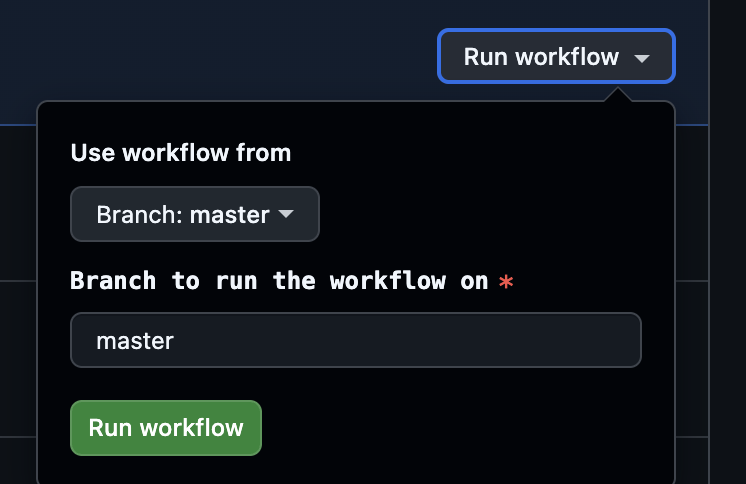
-
-
Pipeline will start at https://github.com/Tsuweiquan/github-to-gcp-oidc-integration/actions/runs/18816894797/job/53686501812
Common Errors
- If gcp-auth step is successful via marketplace actions (
'google-github-actions/auth@v3’) andgcloudcommands returns 403 with such error below
ERROR: (gcloud.storage.cp) There was a problem refreshing your current auth tokens: ('Unable to acquire impersonated credentials', '{\n "error": {\n "code": 403,\n "message": "Permission \'iam.serviceAccounts.getAccessToken\' denied on resource (or it may not exist).",\n "status": "PERMISSION_DENIED",\n "details": [\n {\n "@type": "type.googleapis.com/google.rpc.ErrorInfo",\n "reason": "IAM_PERMISSION_DENIED",\n "domain": "iam.googleapis.com",\n "metadata": {\n "permission": "iam.serviceAccounts.getAccessToken"\n }\n }\n ]\n }\n}\n')
Solution:
- There’s a high probability it’s due to
-
GCP_WORKLOAD_IDENTITY_PROVIDERvariable set wrongly.- Please check the project number is correct
- Please check the workload identity pool name is correct, can be case sensitive
- Please check the provider name is correct, can be case sensitive
- Provider’s Attribute mapping was set wrongly
- Please check that
attribute.aud→assertion.audis set correctly - Please check that
attribute.repository→assertion.repositryois set correctly
- Please check that
- Provider’s Attribute conditions
- Please check that the attribute condition is correct
- use
assertion.sub != ""to cover all cases
- use
- Please check that the attribute condition is correct
-
- The given credential is rejected by the attribute condition
Error: google-github-actions/auth failed with: failed to generate Google Cloud federated token for //iam.googleapis.com/projects/***/locations/global/workloadIdentityPools/twq-github-identity-pool/providers/github-provider: {"error":"unauthorized_client","error_description":"The given credential is rejected by the attribute condition."}
Solution:
- There’s a high probability it’s due to
- Provider’s Attribute conditions set wrongly
- Setting it like this will fail
"assertion.repository_owner"=="Tsuweiquan"- You will need to set it like
assertion.repository_owner=="Tsuweiquan"
- You will need to set it like
- Setting it like this will fail
- Provider’s Attribute conditions set wrongly
References
- Github
- POC Repo Workflow:
- https://github.com/Tsuweiquan/github-to-gcp-oidc-integration/blob/master/.github/workflows/test-gcp-access.yml
- OpenID Attributes that can be used
- https://docs.github.com/en/actions/reference/security/oidc
-
google-github-authmarketplace actions- https://github.com/google-github-actions/auth?tab=readme-ov-file#inputs-workload-identity-federation
- POC Repo Workflow:
- GCP
- Create OIDC in workload identity pools
- https://docs.cloud.google.com/sdk/gcloud/reference/iam/workload-identity-pools/providers/create-oidc#–attribute-condition
- Configure deployment pipelines
- https://cloud.google.com/iam/docs/workload-identity-federation-with-deployment-pipelines#github-actions_5
- Create OIDC in workload identity pools
Enjoy Reading This Article?
Here are some more articles you might like to read next: